

In today’s digital world, creativity is no longer limited to professional designers with expensive software. Whether you’re a crafter, a small business owner, a student, or simply someone who loves experimenting with visuals, having the ability to transform a regular photo into a clean, editable outline opens up endless creative opportunities.
That’s exactly what Vectordad’s Photo to Outline tool delivers: a fast, free, and beginner-friendly way to generate line art from any image—right in your browser. No downloads, no design degree required.
https://vectordad.com/photo-to-outline/
What Is the Photo to Outline Tool?
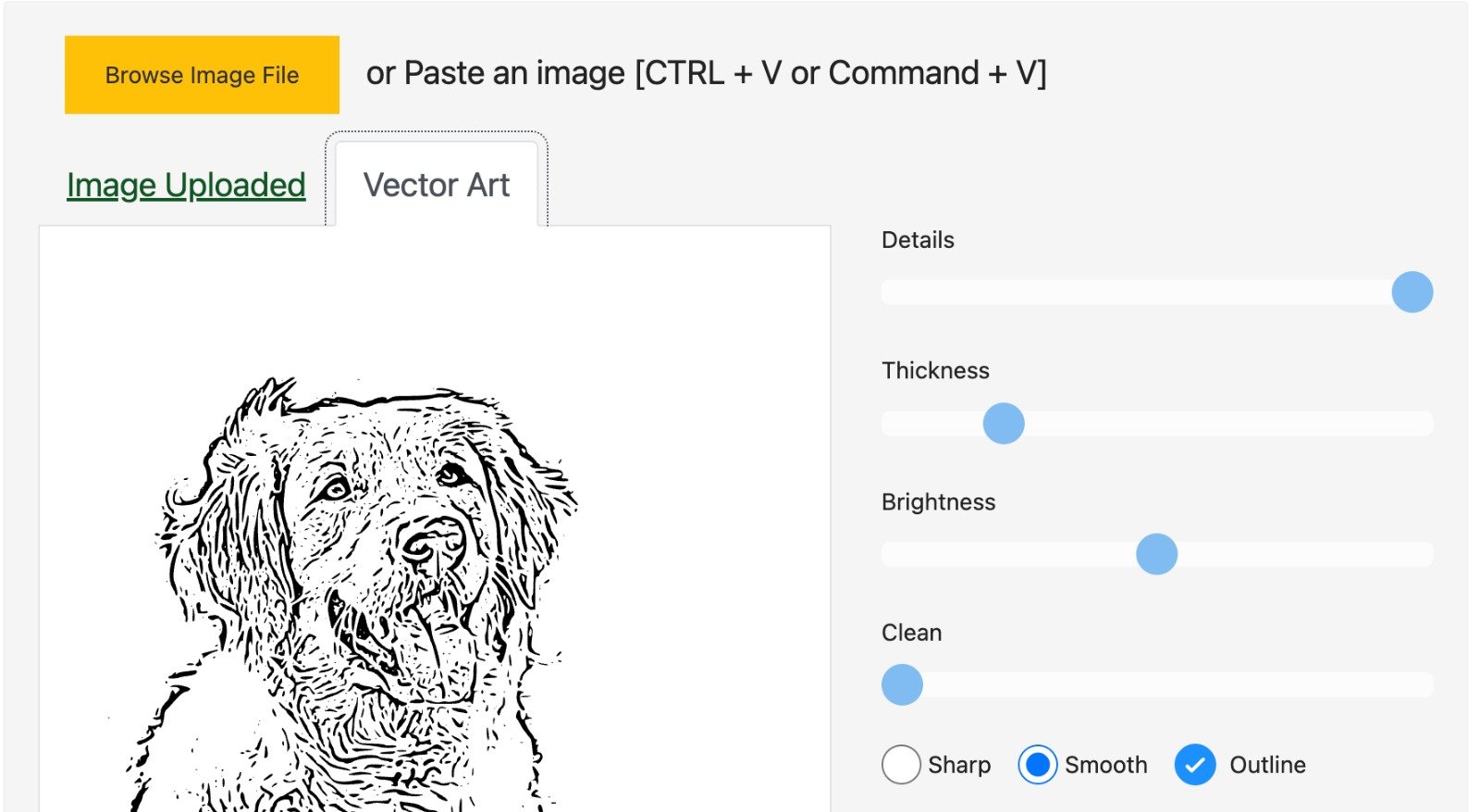
The Photo to Outline tool from Vectordad is an online image converter that automatically transforms your uploaded photo into a simple black-and-white outline. Unlike traditional editing software, which can be time-consuming and overwhelming for beginners, this tool does the heavy lifting for you in seconds.
– Upload a JPG or PNG
– Adjust detail levels, brightness, and noise reduction
– Preview in real-time
– Download in SVG, PNG, JPG, or PDF formats
Because the tool is powered entirely online, you don’t need to install bulky programs like Photoshop or Illustrator. Everything happens instantly, from upload to download.
Why Use an Outline Generator?
Turning photos into outlines may sound like a niche task, but in reality, it unlocks dozens of creative applications:
🎨 DIY Coloring Pages: Turn portraits, pets, or landscapes into printable coloring sheets for kids and adults.
✂️ Crafting & Cutting Machines: Perfect for Cricut, Silhouette, Glowforge, and laser cutters that rely on clean vector outlines.
👕 Custom Apparel & Merch: Convert an image into line art for screen printing on t-shirts, tote bags, or mugs.
🏡 Home Décor: Create wall art, doormats, or wedding signage with personalized outlines.
📚 Education & Presentations: Simplify complex images into diagrams or illustrations for lessons and slides.
💻 Digital Products: Sell downloadable SVGs, coloring pages, or line art packs on Etsy and other marketplaces.
Put simply: if you can imagine it, you can probably outline it with Vectordad.
Step-by-Step Guide: How to Use the Tool
Using Vectordad’s Photo to Outline tool is refreshingly straightforward:
1. Upload Your Photo
Drag and drop your image or browse your device for a JPG or PNG. The upload is instant.
2. Generate the Outline
The tool automatically traces your photo into line art. You’ll see a live preview within seconds.
3. Customize the Output
Use the built-in sliders to:
– Adjust brightness and contrast for better clarity
– Reduce noise and stray dots
– Control the level of detail to simplify or enhance the outline
4. Download in Multiple Formats
Export your finished outline as:
– SVG (scalable vector graphics, ideal for cutting machines and design software)
– PNG or JPG (ready for print or digital use)
– PDF (for easy sharing or professional printing)
You can even set custom resolutions—up to 6000px—for crisp, high-quality results.
What Sets Vectordad Apart?
There are plenty of image converters online, but Vectordad stands out for several reasons:
✅ Free Forever – No hidden paywalls, watermarks, or limits.
✅ No Software Required – Works 100% online in your browser.
✅ Beginner-Friendly – No confusing tools or technical steps.
✅ Device-Friendly – Works on desktop, tablet, or smartphone.
✅ High-Resolution Exports – Perfect for large prints and professional use.
✅ Maker-Focused Features – Designed with crafters, DIYers, and small businesses in mind.
Real-World Examples
To spark your imagination, here are a few ways users have been applying the Photo to Outline tool in real projects:
– A parent turns family photos into coloring pages for their kids.
– An Etsy seller creates digital outline packs for instant download.
– A crafter uses the outlines as SVG files for Cricut vinyl decals.
– A teacher simplifies diagrams for science and history worksheets.
– A small business designs logo-style graphics without hiring a designer.
The beauty of the tool lies in its versatility—it adapts to your creativity.
Final Thoughts
In a world where design tools can often feel overwhelming or locked behind expensive subscriptions, Vectordad’s Photo to Outline tool is a refreshing solution. It makes advanced design functionality accessible to anyone, regardless of skill level or budget.
Whether you’re a crafter, a maker, an educator, or simply someone who enjoys experimenting with visuals, this free online tool is worth bookmarking.
👉 Try it now: https://vectordad.com/photo-to-outline/
Turn your photos into line art. Unlock new creative possibilities. And most importantly—have fun creating!
